

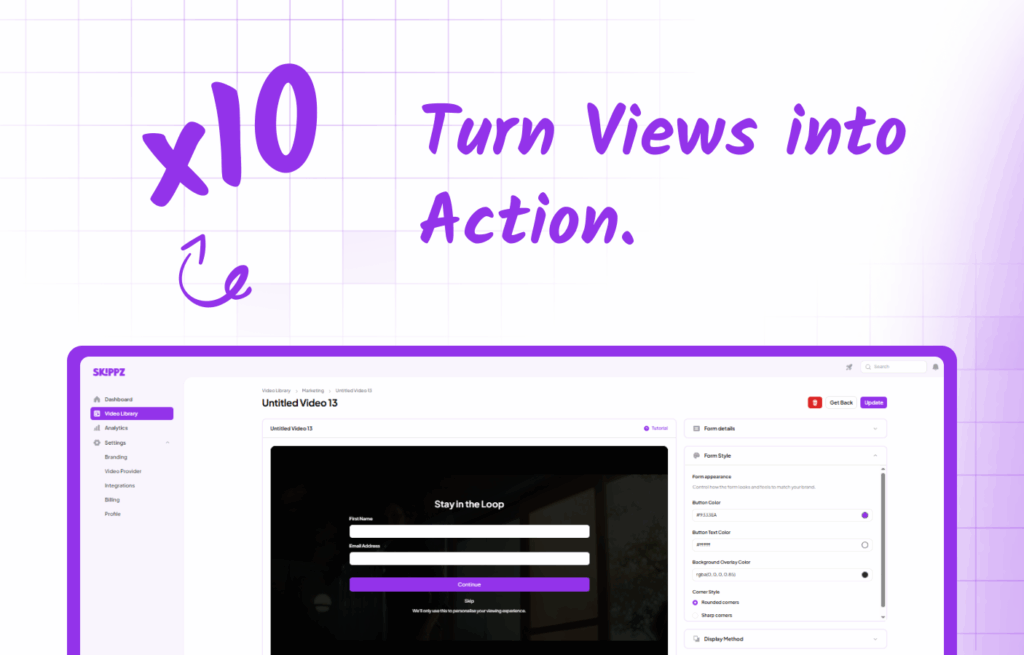
Video is now a core marketing channel, but most businesses confuse visibility with results. High view counts often look impressive while delivering little real business impact. This gap between watching and acting is where video lead generation breaks down, and revenue is lost. Understanding why views fail to convert is the first step toward designing video experiences that generate measurable leads instead of passive attention.
Why Video Views Alone Don’t Convert for Video Lead Generation
Views without action represent missed opportunities that cost businesses millions in potential revenue each year. According to 2025 video marketing research, while 89% of companies use video as a marketing tool, only a fraction successfully convert those views into leads. The fundamental problem is that views don’t equal leads, which is why most video lead generation strategies fail to deliver real results.
Traditional video marketing operates under a flawed assumption that compelling content alone drives conversions. However, attention is most closely tied to the video itself, not after it ends. When you ask users to “click a link later” or “visit our website,” you’re asking them to break their current engagement and perform an additional task. Research shows that interactive elements at the end of videos achieve only 6.8% conversion rates, while those placed at the beginning reach 12.7%. This data reveals a critical insight: timing determines conversion success.
Hence, to convert viewers, the solution requires understanding that conversion actions must happen inside the video itself.
What It Means to Make Videos Actionable
Interactive video marketing is the foundation of effective video lead generation, transforming passive content consumption into active engagement through embedded forms, CTAs, and real-time responses. This approach differs fundamentally from traditional video marketing by creating conversion opportunities during peak viewer attention rather than after the content ends.
Embedded Forms vs External Forms
The choice between embedded and external forms significantly impacts conversion rates. Embedded forms appear directly within the video player, maintaining viewer context and reducing abandonment rates. External forms require users to leave the video environment, creating decision fatigue and increasing abandonment risk. Studies indicate that each additional step in the conversion process reduces completion rates by approximately 15%. This distinction is critical for video lead generation, where reducing friction directly impacts conversion performance.
| Form Type | Conversion Rate | User Experience | Implementation Complexity |
| Embedded Forms | 24% higher | Seamless | Low |
| External Forms | Baseline | Disruptive | High |
| Pop-up Forms | 18% lower | Intrusive | Medium |
CTAs Triggered by Time, Engagement, or Intent
Strategic CTA placement based on viewer behavior maximizes conversion potential. Time-based triggers activate at predetermined moments, while engagement triggers respond to user actions like pausing or rewatching sections. Intent-based triggers represent the most sophisticated approach, activating when viewer behaviour indicates purchase readiness. These might include watching product demos to completion or revisiting pricing sections.
Why Interactive Video Outperforms Static Embeds
Interactive video content generates 32% more conversions than static alternatives because it maintains continuous engagement throughout the viewing experience. Static videos create a passive consumption environment where viewers remain detached from the content.
Interactive elements introduce participation requirements that increase cognitive involvement and emotional investment. This psychological principle, known as the “IKEA effect,” suggests that people value things more highly when they’ve contributed effort to creating or customising them.
How Built-in Video Actions Solve the Conversion Gap
Interactive video elements are essential for scalable video lead generation because they adapt based on viewer behaviour, creating personalised experiences that increase relevance and conversion probability. Forms and CTAs can be layered directly onto videos, creating seamless conversion experiences that maintain viewer engagement. This integration eliminates the traditional disconnect between content consumption and lead capture, resulting in significantly higher conversion rates.
Built-in forms eliminate the multiple steps typically required for lead capture:
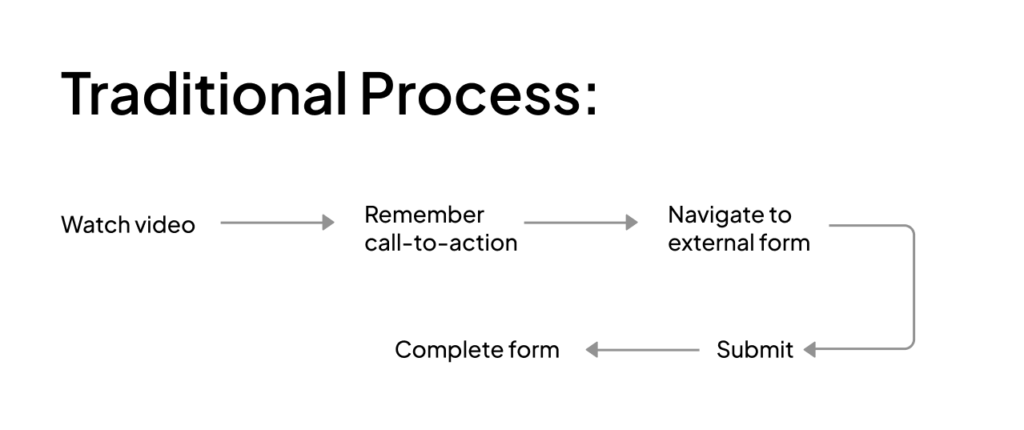

The streamlined process reduces cognitive load and decision fatigue, increasing completion likelihood.
The Attention Curve Problem
Traditional video marketing follows a flawed model where conversion attempts occur after attention has already declined. The viewer attention curve shows peak engagement during the first 30 seconds and again during compelling content moments, not at the video’s conclusion.
This is where Skippz enters as the enabler, not the hero. Skippz provides the infrastructure that allows your content to be the hero while ensuring conversion opportunities align with natural attention peaks.
Skippz Marketing Suite: Turn Videos Into Conversion Tools
The Skippz Marketing Suite is designed to support video lead generation by converting video viewers into leads and actions without breaking the viewing experience. Instead of sending viewers away from your video, you can guide them to take action directly inside the player. Every interaction is built to feel natural, timely, and relevant to each viewer.
What makes the Marketing Suite powerful is its flexibility. You control what appears, when it appears, and how viewers interact; all without hard timelines or static placements. Powered by Floating Timeline Logic, actions respond to viewer behaviour rather than fixed times, allowing forms and CTAs to appear based on engagement, playback progress, or interaction patterns. This ensures actions show up at the moments viewers are most receptive, not at arbitrary points in the video.

Try Skippz Free
Start Converting Your Videos Today
How to Add a Lead Capture Form to a Video with Skippz: Step-by-Step Guide
Lead capture forms allow you to collect viewer information at moments of high engagement without disrupting playback. You can control when forms appear, how they behave, and what data you collect.
Step 1: Enable Forms for Your Video
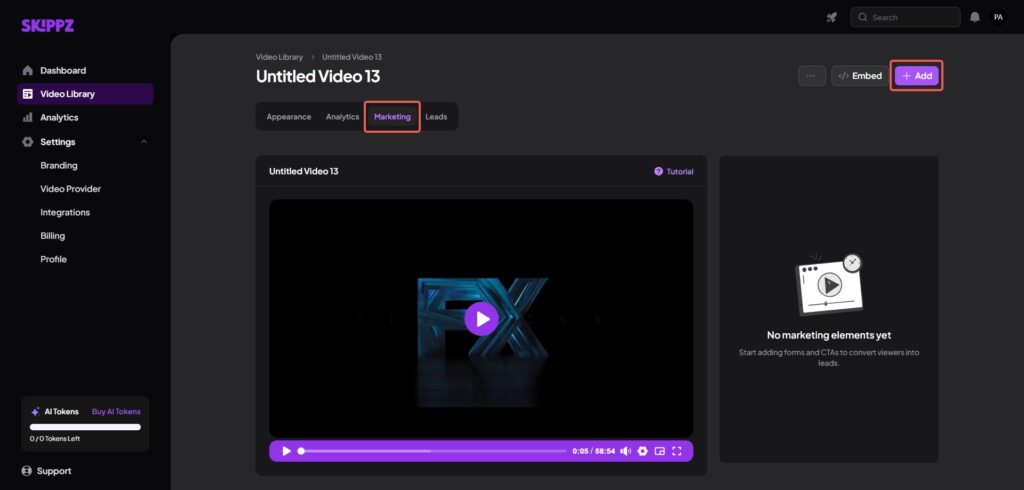
Select the video you want to optimise from your dashboard and select the Marketing Suite. This is where all interactive elements are configured for that specific video. Then, click the (+Add) button in the top right corner to select forms.
Step 2: Create and Customise
Start by filling in the form details. Choose the information you want to add and define the fields you need, such as email, name, or custom inputs. You can mark fields as required or skippable based on your lead capture goal. Next, configure form behaviour by deciding whether the video pauses when the form appears, continues playing in the background and resumes automatically after submission. You can add a title, bottom text and button name as well.
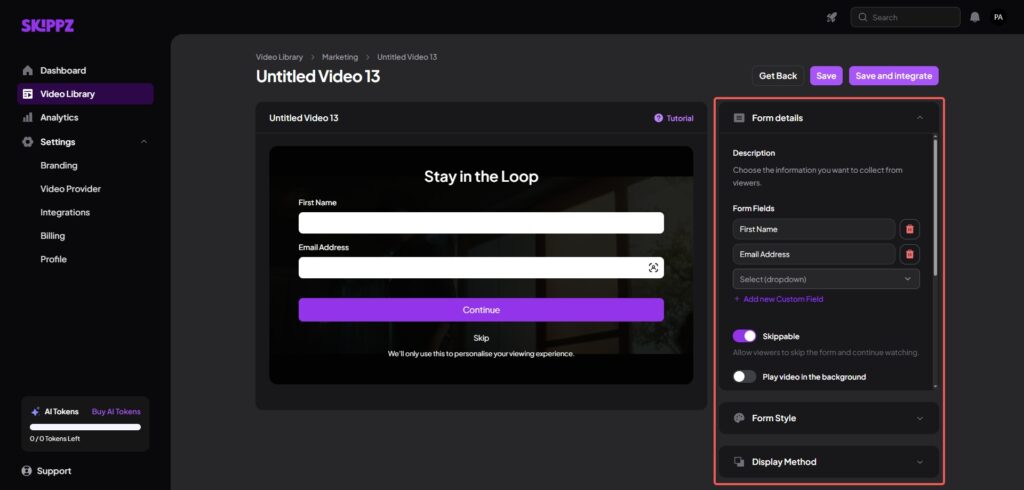
Additionally, customise the visual appearance of the form. You can adjust button, text and background overlay colours, so the form aligns with your brand and fits naturally within the video player. Furthermore, there’s an option to adjust corner styles to round or sharp corners.
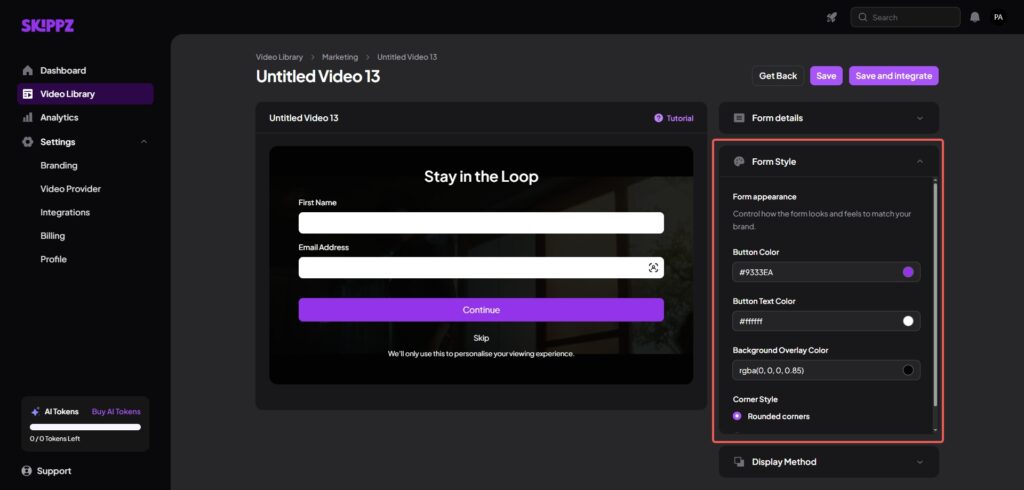
The display method allows you to choose how the form appears during video playback, either as a timed pop-up or button click.
Step 3: Add Timing
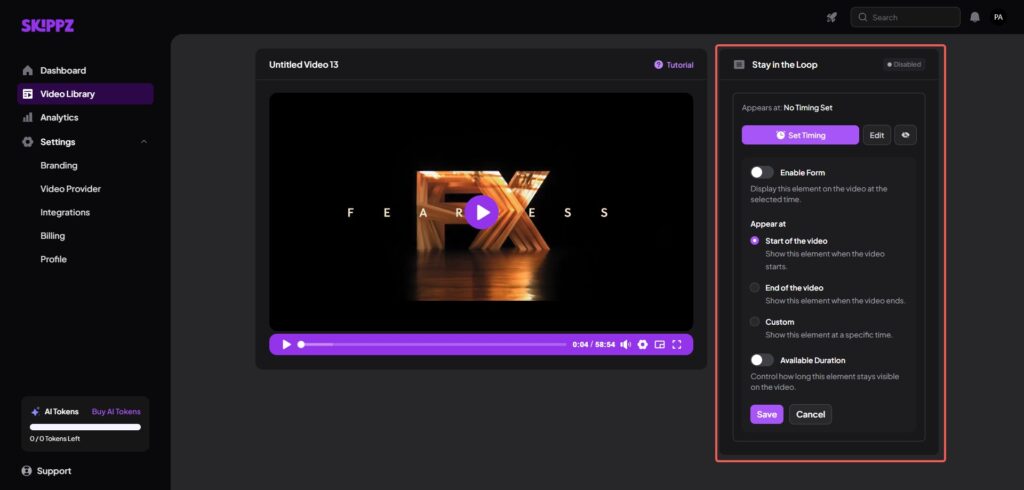
Once satisfied, you can save your changes or save and integrate. When you click save, a window will appear to set timing for the form, whether to appear at the start, end or a custom time and when to expire. These options ensure the form feels purposeful rather than intrusive.
Step 4: Publish and Manage Your Video
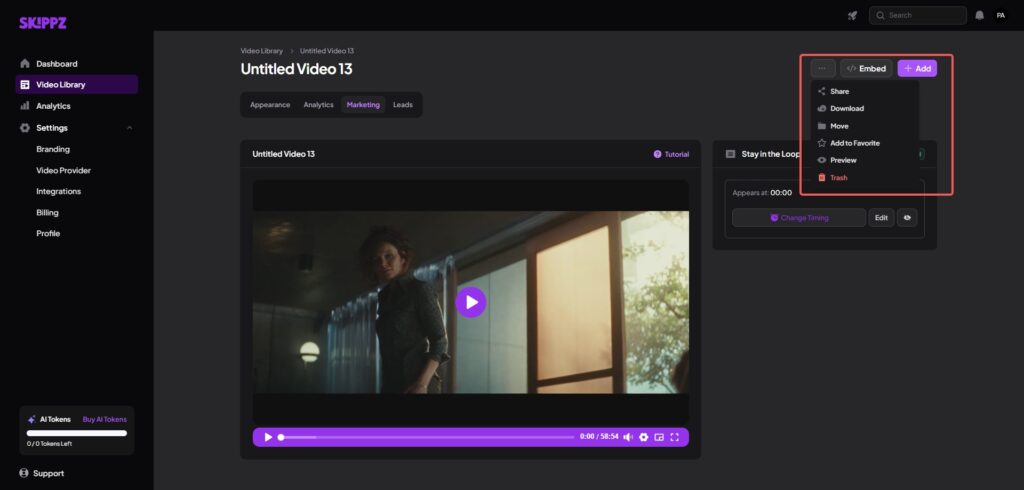
After saving the changes, click the Embed button in the top right corner to copy an embed code. You can choose between two embed options. The Lightboxoption shows the video as a thumbnail or text link. The On Page option allows embedding the video directly using either the Standard embed or the Legacy iFrame option if script embeds are not suitable. Moreover, from the three-dot menu in the top-right corner of the video, you can share, download, move, add to favourites, preview, or delete the video.
How to Add CTAs Inside Your Video with Skippz
Effective video CTAs rely on timing, relevance, and seamless integration. Skippz enables highly flexible in-video CTAs that can appear, move, or update based on viewer interaction through its Floating Timeline Logic.
Step 1: Enable CTAs for Your Video
Open the CTA settings within the Marketing Suite and enable CTAs for the selected video. Choose the CTA format that best suits your goal, such as buttons, text prompts, or interactive links.
Step 2: Create and Customise
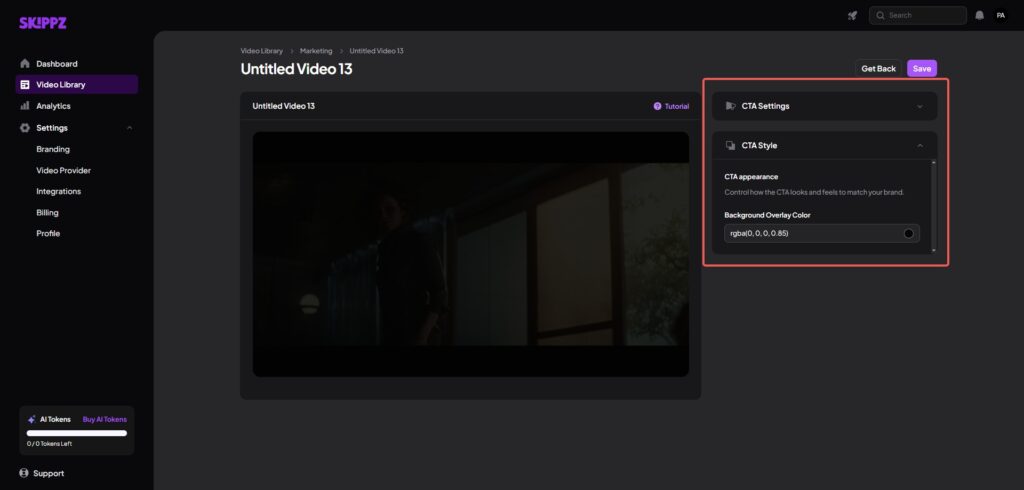
Firstly, choose CTA settings. Here, you can add the CTA name, destination URL, and select its type and where to place it. Furthermore, you have to choose whether the CTA will be open in a new tab, skippable and keep the video playing in the background while the CTA is visible.
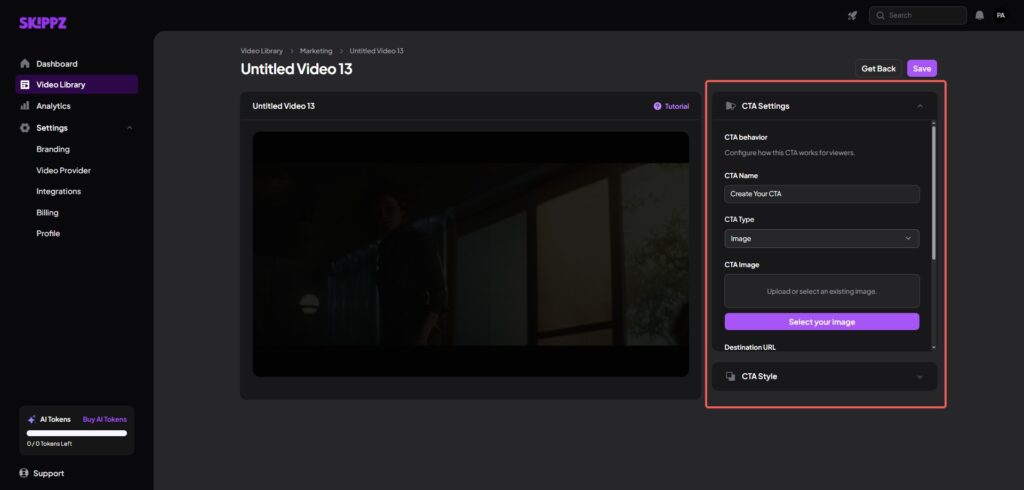
The CTA styling options allow you to change button colours and background overlay colours to match your needs.
Step 3: Add Timing
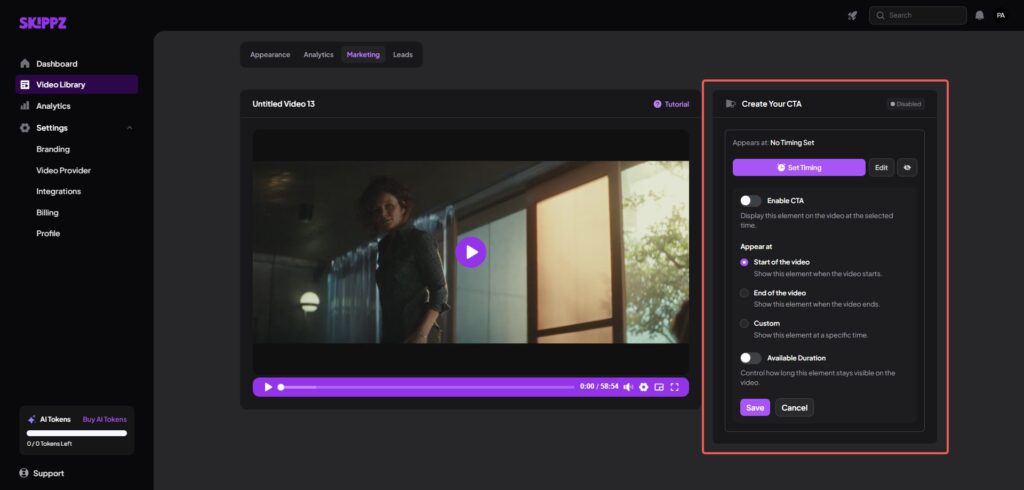
Similar to forms, the timing options appear once you save the options. You can choose when you need this CTA to appear and expire.
Step 4: Publish and Manage Your Video
Finally, you can manage the video using the options in the top-right menu, including embed, share, download, move, add to favourites, preview, or delete. These controls give you quick access to manage and distribute your video the same way you do when working with forms.
When to Use Forms vs CTAs (Practical Guidance)
Forms capture detailed lead information while CTAs drive immediate action, making the choice between them dependent on specific conversion goals and audience readiness. Understanding when to deploy each tool maximises conversion efficiency and user experience quality.
Use Forms When You Want Lead Capture
Lead capture forms work best when audience interest is high, but purchase readiness remains unclear. These situations require collecting contact information for nurturing campaigns rather than immediate sales attempts. The following are a few ideal scenarios for using forms.
- Product Demos: When viewers are exploring features and capabilities, forms help capture interest before a buying decision is made. This allows follow-up without forcing an immediate commitment.
- Webinars: Educational sessions naturally justify asking for contact details. Forms ensure attendance tracking and enable post-webinar communication.
- In-Depth Tutorials: Advanced how-to or training content attracts viewers who want deeper engagement. Forms help identify serious learners and nurture them over time.
- Product Comparisons: Videos comparing features, plans, or solutions help viewers evaluate options. Forms capture interest from prospects who are still deciding and want follow-up details before committing.
- Consultation or Discovery Calls: Videos introducing services or solutions work well with forms when viewers may want a conversation rather than an instant purchase.
Use CTAs When You Want Immediate Action
CTAs excel when viewers demonstrate purchase readiness or require immediate action. These situations prioritise conversion speed over information collection. Here are a few examples of when lead capture CTAs work best.
- Sales and Launch Videos: Product launches and promotional videos create urgency. CTAs allow viewers to act immediately while intent is high.
- Customer Testimonials: Trust-building videos are ideal moments to guide viewers toward the next step. A CTA channels confidence into action.
- Pricing and Offer Explainers: When pricing is clearly presented, viewers are often ready to decide. CTAs reduce friction by pointing directly to checkout or contact.
- Free Tool or Trial Access: Short educational videos promoting tools or trials benefit from CTAs. Viewers can sign up instantly without extra steps.
- Community or Event Signups: Videos inviting users to join a community or event work best with CTAs. Immediate access reinforces momentum and engagement.
Conclusion
Video lead generation transforms content from passive entertainment into active conversion assets through the strategic implementation of forms and CTAs. The key lies in understanding that videos should guide action, not just inform. Built-in forms and CTAs remove friction between content consumption and conversion, creating seamless experiences that respect viewer attention while achieving business objectives.
Skippz allows videos to function as conversion assets by providing the infrastructure necessary for professional interactive experiences without technical complexity. The platform’s Marketing Suite enables creators to implement proven video lead generation strategies while maintaining full control over their content and conversion processes.
Frequently Asked Questions
How soon after implementing video forms can I expect to see leads?
Most businesses see immediate lead capture improvements within 24-48 hours of implementing embedded video forms. The key is proper placement during high-engagement moments rather than at video endings. Skippz provides real-time analytics to track form performance, allowing you to optimise placement and messaging for maximum conversion rates from day one.
Can video CTAs work effectively on mobile devices?
Yes, mobile-optimised video CTAs actually convert better than desktop versions when designed properly. Over 75% of video viewing occurs on mobile devices, making mobile-first CTA design essential. Skippz automatically optimises all video CTAs for mobile viewing, ensuring consistent functionality and visual appeal across all screen sizes and devices.
How does video lead generation compare to traditional lead magnets?
Video forms consistently outperform static lead magnets by 32% because they maintain continuous engagement throughout the capture process. Traditional lead magnets require users to consume content, then separate complete forms, creating decision fatigue. Video embedded forms capture leads during peak engagement moments, resulting in higher quality leads with better nurturing potential. This is why video lead generation consistently outperforms traditional lead capture methods.
References
1: YansMedia, “100 Video Marketing Statistics for 2025,” 2025. On average, sites that use video have a 4.8% conversion rate compared to 2.9% for non-video sites. https://www.yansmedia.com/blog/video-marketing-statistics
2: SundaySky, “2025 Video Marketing Statistics That Will Blow Your Mind,” 2025. 89% of businesses use video as a marketing tool in 2025. https://sundaysky.com/blog/2025-video-marketing-statistics/
3: Tavus, “31+ Video Marketing Statistics to Know in 2025,” 2025. Interactive elements at the end of videos have 6.8% conversion rates while beginning elements achieve 12.7%. https://www.tavus.io/post/video-marketing-statistics